
Where? Settings > Starting Inventory > Starting Tanks & Products
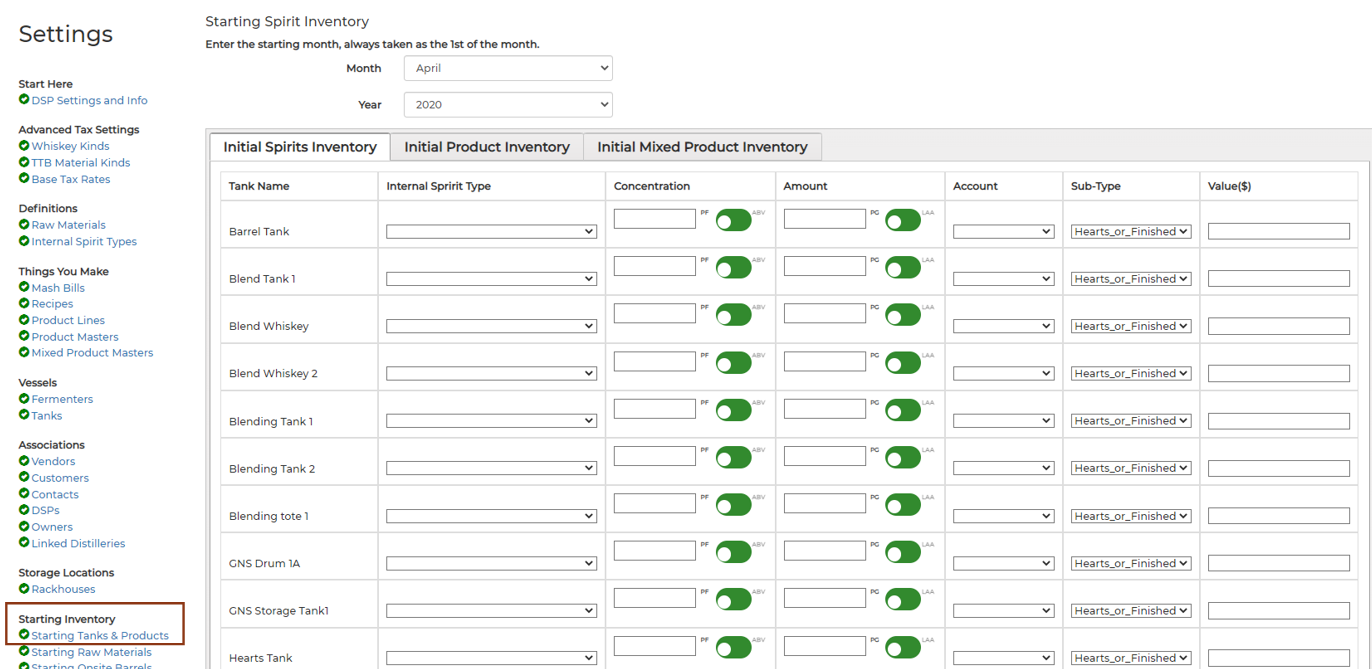
Starting Inventory Process Summary:
- Enter the starting Proof Gallon inventories in tanks and counts of cases and bottles in-bond as of the First of the Starting Month.
- Populate and Upload the Barrel Upload Template file with data for all barrels on hand as of the First of the Starting Month.
- Run the TTB Reports for the Starting Month in Whiskey Systems. Compare the Starting total Proof Gallons in Whiskey Systems against the Reported End of Month Inventories on the TTB Reports (Storage and Processing) filed for the Previous Month.
- If there is a data entry error in Whiskey Systems, reset the account using Setup - Reset Account. Leave the “Also Delete Starting Tank Transactions and Product Inventory” Box Unchecked to Edit the starting tanks and cases inventory already entered. You will always need to re-upload the Barrel Template after a Reset.
- Once you are confident with the data entered into Whiskey Systems, check for differences between the TTB Reported Ending PG Inventories and Starting PG Inventories in Whiskey Systems. If needed, manually amend the TTB Reports filed for the Previous Month with a Gain or Loss to make sure your Reported Ending Inventories match the Starting Inventories in Whiskey Systems.
Starting Tank Inventory
- To enter the Starting Inventory of all Tanks as of the First of the Starting Month users will need Internal Spirit Types created to represent all Spirit entering Whiskey Systems, Total Proof Gallons (PGs) and the Proof/ABV of the Spirits in each Tank, and the DSP Account where the spirit inside of Tanks is currently reporting (Production, Storage, or Processing Bulk). Physical gauge results are highly recommended for this process!
- Production Account: This account should contain distillates collected but not yet reported as Produced to the TTB. Common examples of Production account liquids are Low Wines, Heads, and Tails. Production account liquid may also include Hearts, Rectified or Finished Spirits users plan to re-Distill or Barrel but have not yet been reported as produced on a TTB Production Report. The Federal Production report will display PGs in Part I when they leave Production bound for Storage, Processing Bulk or Transfer In Bond.
- Storage Account: This account should contain bulk spirit in Storage Tanks which have been Distilled and transferred into Storage Tanks from the Production account, or un-processed spirit received via Transferred in Bond. Starting Tank Inventory should NOT include any PGs residing in oak Barrels/Cooperages. Users with Storage Barrels should review Barrel Upload Instructions for guidance on uploading Starting Barrel/Cooperage inventories.
- Processing Bulk Account: This account should contain spirit held in Blending or Bottling tanks which have been or will soon be processed (manipulated, cut, blended, flavored, etc). This account may also contain processed spirit Received In-Bond. A common example of spirit which belongs in Processing Bulk would be a pre-mixed batch of flavored spirit that will soon be Bottled, or spirit recently transferred from Production or Storage into Processing Bulk which will be cut/flavored/manipulated and Bottled.
- Excluding Starting Inventories held inside of Barrels, the total Proof Gallons (PGs) in your Whiskey Systems Tanks by Internal Spirit Type Reporting Category should match the OHEOM (On-Hand End of Month) value seen in the previous month's Federal Storage and Processing Reports.
For example: if 300 Proof Gallons of Rum was reported as OHEOM on your filed Storage Report for the previous month, those 300 PGs of Rum should be represented when entering Starting Inventories in Whiskey Systems. This goes for Processing Bulk Starting Inventories as well - if 100 Proof Gallons were reported as OHEOM in Processing Pt I - Bulk Ingredients in the filed report from the previous month, all 100 PGs should be represented in Starting Inventories entered into Whiskey Systems.
Inventory of Bonded Cases (Tax Paid inventories excluded):
- Perform a physical inventory of all cases and loose bottles by Product Master in Bonded inventory as of the First of the Starting Month. This inventory should not include any cases moved out of Bonded premise into a Tax Paid area like a Gift Shop or Tasting Room in a previous month.
- You can estimate how many total PG in Finished Goods you have in inventory by multiplying the case and bottles counts by the PG/case and PG/bottle factors from the Product Master Setup Screen.
- Almost EVERY distillery estimates the # of Proof Gallons per Case and Bottles differently. This means that the Ending Processing “Bottled and Packaged” Proof Gallon inventory will be different then what Whiskey Systems will calculate as the total PG of your starting cases and bottles. An amendment to the previous report is required. More details below on if Ending and Starting Inventories do not match.