Once a Mixed Product Master is set up in Whiskey Systems, users can pack Mixed Product Masters via the Pack Mixed Cases tool. To Pack Mixed Cases in Whiskey Systems:
Click the Side Menu in the upper left corner of WS:
Then navigate to Processing > Mixed Cases > Pack Mixed Cases: 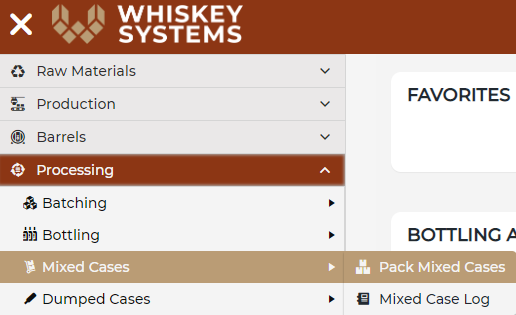
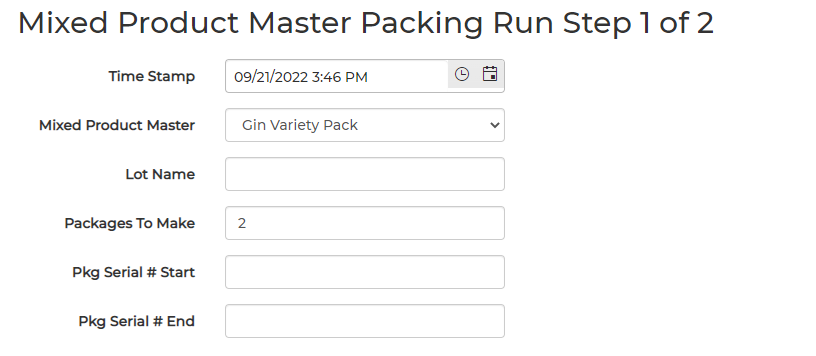
Mixed Product Master Packing Run Step 1 of 2:
Enter in each field:
- The Time Stamp the packing run occurred in the DSP.
- Select the Mixed Product Master to pack from the dropdown menu.
- If desired, enter a Lot Name.
- The total number of Packages to Make in this packing run.
- If desired, Pkg Serial # Start & Pkg Serial # End details.
- Note: Whiskey Systems does not offer Case Labels for Mixed Product Master Packing Runs.
Once the Packages to Make value has been entered, the Required Component Bottles table will display the total Qty Required to complete the Pack. Qty Available will also populate the number of Bottles on-hand in Whiskey Systems for each Product Master; this value appearing in red indicates that the Product Master inventory needed to complete this Pack is not available. Users cannot move on to Step 2 of the Mixed Product Master Packing Run until this is rectified:
Required Component Bottles will display both Qty Required and Qty Available values in black text when adequate inventory is available for the Pack. Select Consumed Component Bottles details the Lot Name/Number the Bottles will be consumed from for this Pack:
The Select Consumed Packaging Materials table displays the Raw Materials attached to the Mixed Product Master involved in the Pack. Available Units On-Hand and Units Consumed populate based on the Packages to Make value; if the Units On-Hand value is lower than the Units Consumed value, Units Consumed will display in red:
Users can either click the blue Enter Receipt option in the table to Enter a Whiskey Systems Purchase Order Receipt for the required inventory, or users can proceed by clicking Next. Pack Mixed Cases will allow users to advance without the necessary Raw Materials to consume.
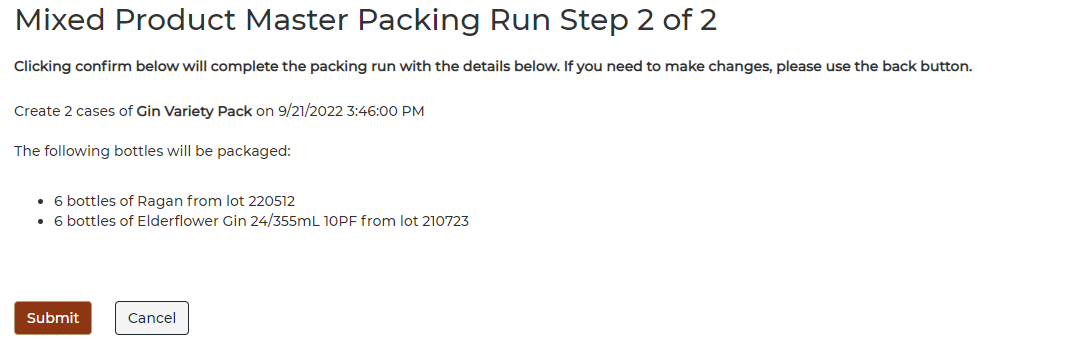
Mixed Product Master Packing Run Step 2 of 2:
Review the Pack details displayed on the page, then click Submit to confirm details and Pack Mixed Cases: