
Before users can enter Cooks in Whiskey Systems, a Mash Bill for the Cook must be added to the Things You Make section of the Setup Wizard.
To Add a New Mash Bill:
Navigate to Settings > Things You Make > Mash Bills
Click the “+ Add New Mash Bill” button

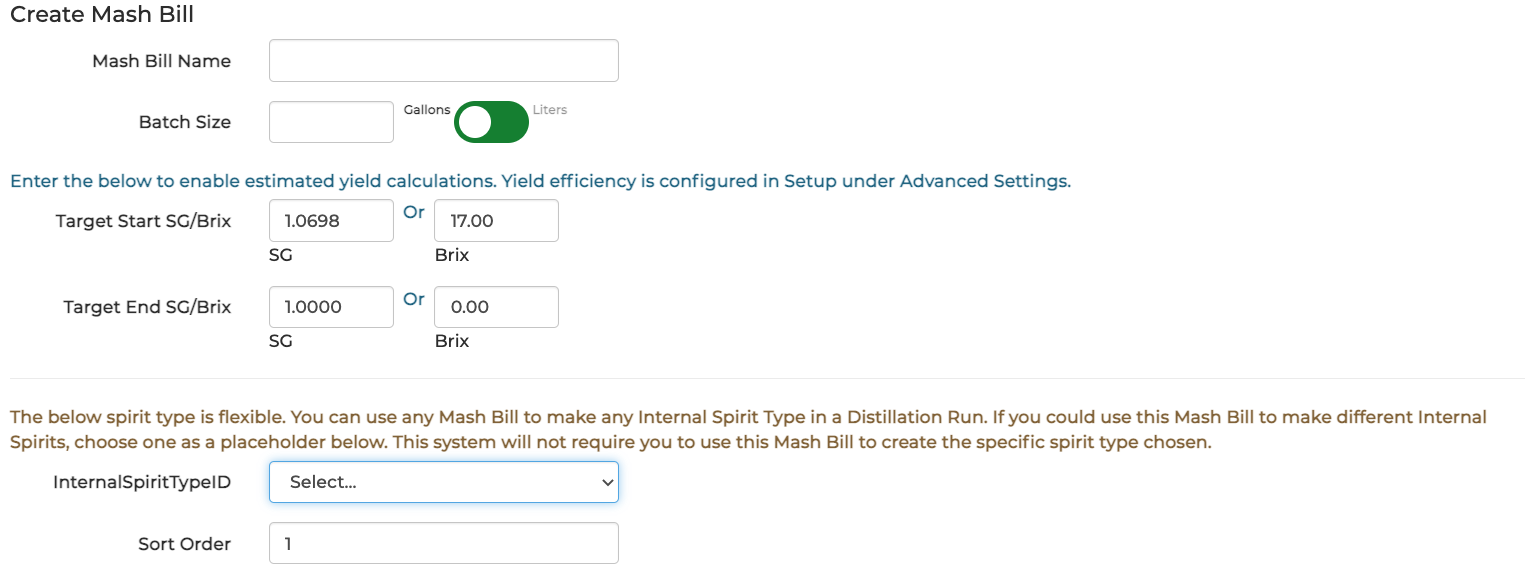
- Mash Bill Name: Assign the new Mash Bill a Name that will be used to identify it in Whiskey Systems Transactions and Reports.
- Ex: Corn Whiskey, Bourbon Mash, etc.
- Batch Size: Enter the standard Batch Size the Mash Bill produces in Gallons or Liters.
- Target Start/End SG/Brix: Enter Target Start and End gravity readings in SG or Brix to enable estimated yield calculations. Yield Efficiency can be configured from Advanced Settings within the Setup Wizard.
- Internal Spirit Types: Attach the desired Internal Spirit Type to the New Mash Bill.
- Ingredients:
- Select "+Add New" to Add Fermentable and Fermentation Support Raw Materials which should be consumed in the Mash Bill.
- Enter the quantity of Units used In the Batch the Mash Bill will support.
- Ex: If Corn is stored in Pounds, and the Mash Bill will deplete 500 Pounds, Units In Batch = "500" (do not type the Unit of Measure or include other alphabetical characters in this field).
- If the Raw Material is tracked in Whiskey Systems as a Fermentable, enter a Fermentable Percentage (if desired - if all usage of the Material should be considered Fermentable, enter 100%).
- Click Update after above fields have been completed to store the Raw Material usage details in the new Mash Bill. Edit/Delete stored Ingredient entries as needed using the form options:

When all required data entries and Ingredients have been entered, click Submit to complete and save your New Mash Bill.